 Rekit
What subscription churn is
Churn is the share of your subscribers who stop. If you start the month with 200 subscriptions and 6 are cancelled, you've lost 3% of your recurring revenue base, and every one of those customers has to be replaced before you grow again.
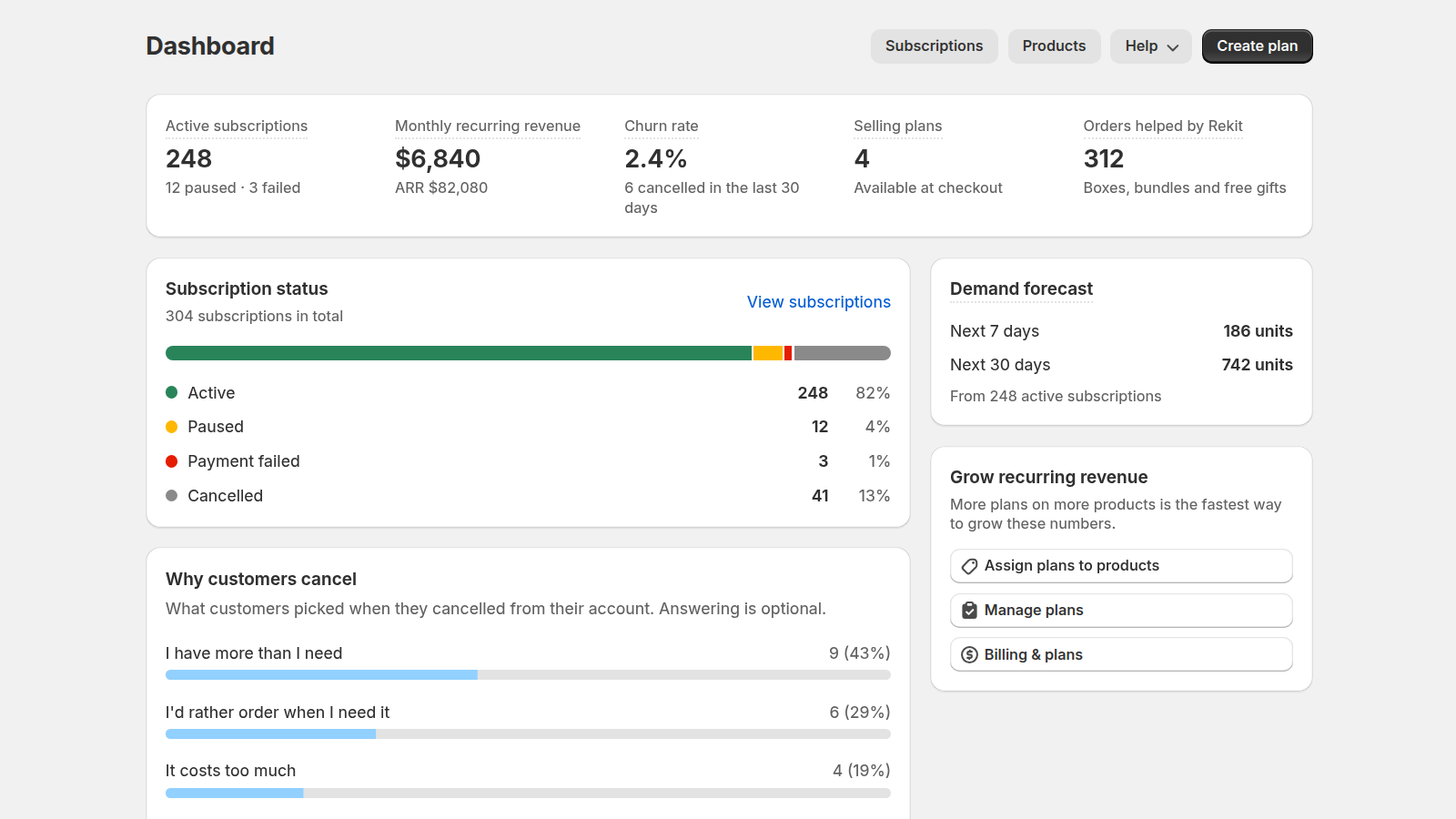
Rekit's dashboard shows your churn rate as the subscriptions cancelled in the last 30 days, divided by your active, paused and cancelled ones. Watch it month to month: the number matters less than which way it's moving.
There are two kinds of churn. Active churn is a customer who decides to cancel. Passive churn is a subscription that ends because a payment failed, often without the customer meaning to leave at all. The fixes are different, so this guide covers both.
Find out why subscribers cancel
You can't fix a reason you don't know. When customers cancel from the Rekit customer portal, they can pick a reason: it costs too much, they have more than they need, they're not happy with the product, delivery problems, they'd rather order when they need it, or something else. Answering is optional, so it never stands between a customer and the cancel button.
You'll see each customer's answer on their subscription's page. On the Freeze plan, the dashboard also adds them up in Why customers cancel, so the most common reason is the first thing you see.
Make skipping and pausing easier than cancelling
A subscriber with three unopened bags in the cupboard doesn't want to leave; they want a break. If the only way to get one is to email you, many will cancel instead. Give them buttons.
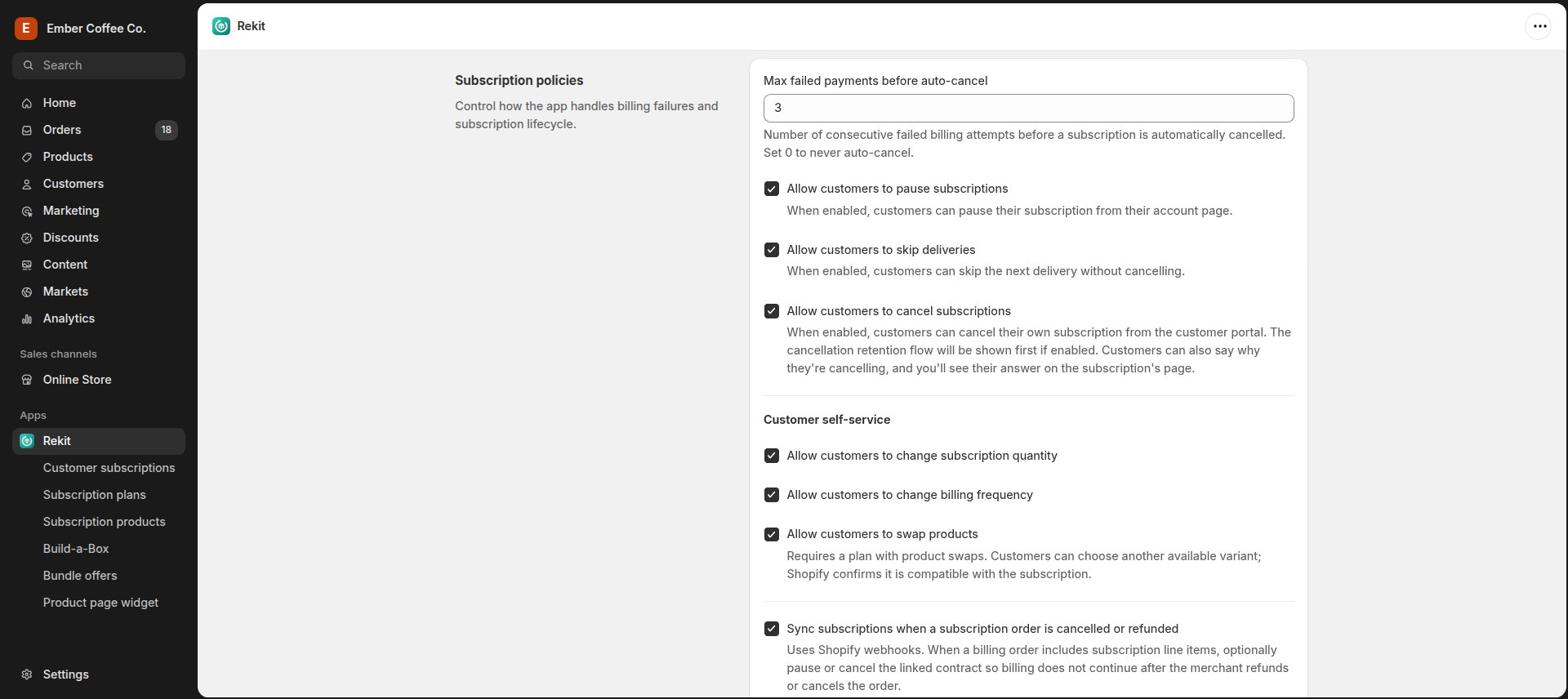
In Rekit, go to Settings → Subscription policies and turn on Allow customers to pause subscriptions and Allow customers to skip deliveries. Under Customer self-service, you can also let customers change their quantity and how often they're billed. All of these run in the customer portal, which comes with the Chill and Freeze plans.
To put the portal in your store's menu, follow the customer portal steps in the setup guide.
Offer an alternative before they cancel
The moment someone clicks Cancel is your last chance to keep them. Instead of a plain confirmation, show the options they may not have noticed.
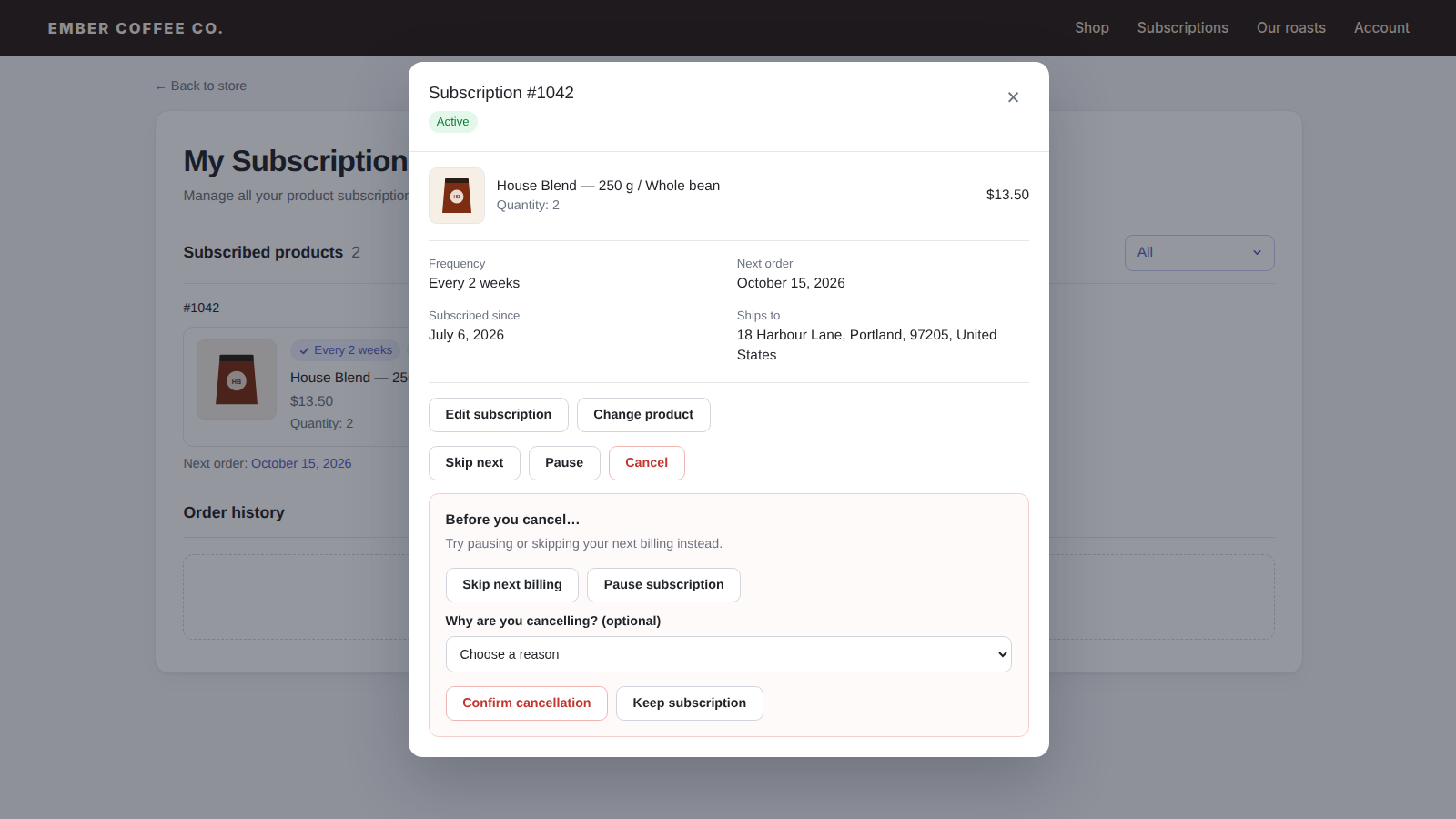
With Rekit's cancellation retention flow (Freeze plan), customers who click Cancel first see Before you cancel… with buttons to skip their next billing or pause the subscription. If they still want to go, they confirm, and can tell you why. Turn it on in Settings with Enable cancellation retention flow.
Match each cancel reason with a fix
Once you know the top reasons, you can fix the cause, not just the symptom.
| Reason customers pick | What usually helps |
|---|---|
| I have more than I need | Offer a less frequent schedule, like every 2 months, and let customers change their frequency or quantity themselves. |
| I'd rather order when I need it | Make skip and pause one click. A subscriber who skips twice is still a subscriber. |
| It costs too much | Show the saving clearly on the product page, offer a smaller size, or reward subscribers who stay with a loyalty discount. |
| I'm not happy with the product | Let them swap to another product or variant (Freeze plan) instead of leaving your store. |
| Delivery problems | Look at your shipping: carrier, packaging and timing. This one is about operations, not the subscription. |
Stop losing subscribers to payment problems
Passive churn is the easiest to win back, because the customer never decided to leave. A card expires or a bank declines one charge, and the subscription quietly ends.
- Retry failed payments. On Chill and up, Rekit retries a failed renewal every 3 days. In Subscription policies, set Max failed payments before auto-cancel to how many failures you'll allow, or 0 to never cancel automatically.
- Tell the customer. Customers get an email when a payment fails, so they can update their card before the next retry.
- Avoid surprise charges. Subscribers on monthly and yearly plans get a reminder 3 days before each renewal, so a charge never comes out of nowhere.
Reward subscribers who stay
Give customers a reason to stay beyond the first few orders:
- Loyalty discounts: an extra percentage off from an order you choose, for example 5% more from the 4th delivery. Available on every Rekit plan, including Free.
- Commit and save more: a bigger discount for customers who agree to a minimum number of orders. Rekit's "Commit & save more" template is 15% off for at least 3 orders.
- A free gift with the first order: a small thank-you that makes the first box feel special.
For ideas on how much to give, see how much discount to offer.
Win back subscribers who left
Some customers will cancel anyway. That doesn't have to be the end. On Chill and up, Rekit tags customers as active, paused, cancelled or failed in Shopify, so you can build a segment of cancelled subscribers and send them a win-back email with your email app, for example when a new roast or product launches.
On Freeze, Rekit also starts Shopify Flow workflows when a subscription is cancelled or a renewal payment fails, so you can alert your team or send the customer to your email tool automatically.
Churn checklist
- Check your churn rate on the Rekit dashboard every month.
- Turn on skip, pause, and frequency and quantity changes in Subscription policies.
- Add the customer portal to your store's menu.
- Turn on the cancellation retention flow.
- Read the cancel reasons and fix the top one first.
- Set how many failed payments you'll allow before a subscription is cancelled.
- Add a loyalty discount for subscribers who stay.
- Send cancelled subscribers a win-back email when you have something new.
New to subscriptions? Start with how to add Subscribe & Save to Shopify, or see an example for a single product type in how to sell coffee subscriptions.
Keep more of your subscribers
Free for your first 25 subscriptions. The customer portal starts at $5/month, with 0% transaction fees.