 Rekit
What a build-your-own box is
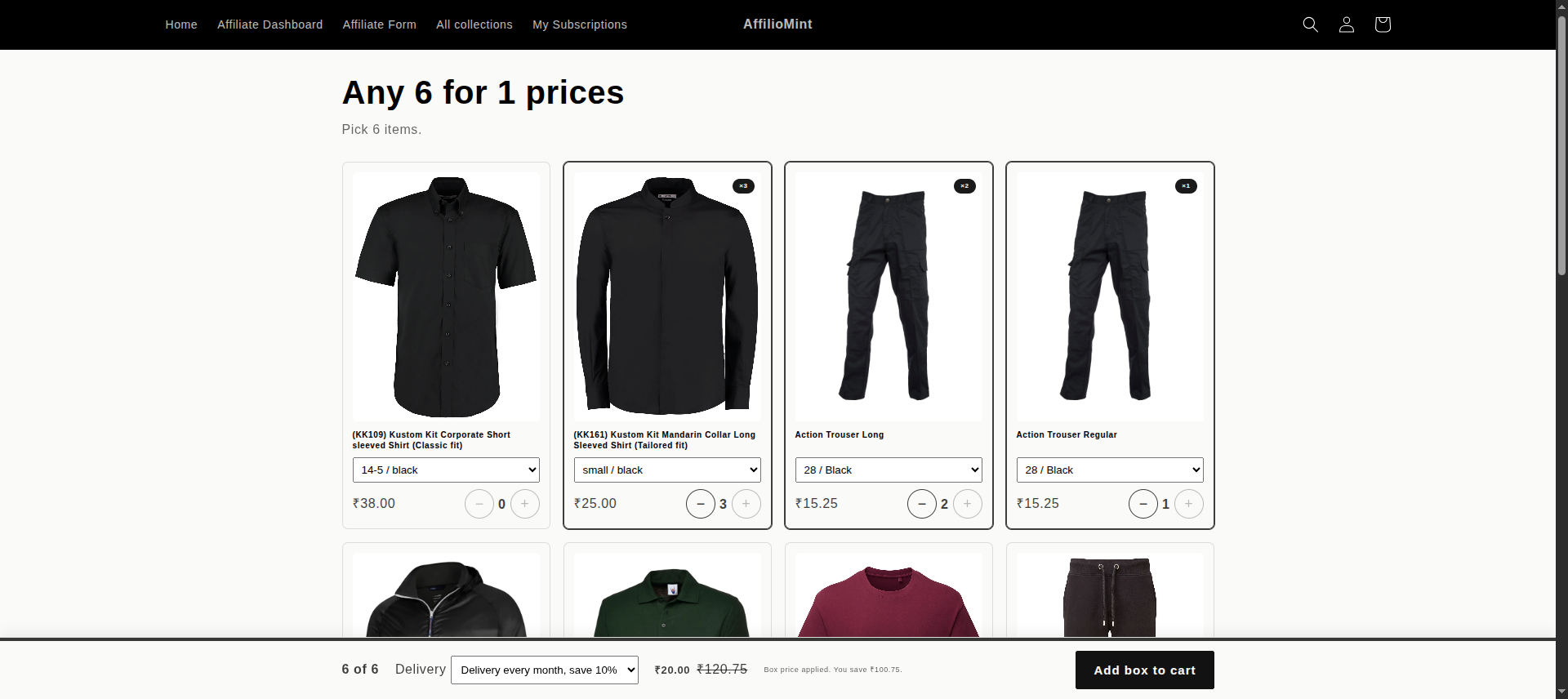
In a curated box, you decide what goes in. In a build-your-own box, the customer does: "any 6 bags of coffee", "pick 4 to 8 snacks" or "choose 3 skincare minis". They fill the box on one page, choose how often it arrives, and check out once.
It works well when you sell many small items that people like to mix: coffee and tea, snacks, pet treats, candles, beauty minis, spices. Customers buy a whole box instead of a single item, and choosing their own mix gives them a reason to come back and change it.
Before you start
- A payment provider that supports subscriptions. Shopify Payments does. Subscriptions are charged automatically, so Shopify only allows them with providers that can store a payment method.
- A subscription app with a box builder. This guide uses Rekit. Build-a-Box is part of the Freeze plan ($10/month or $119/year), which starts with a 7-day free trial.
- The products customers can pick. They're normal Shopify products. Every available variant of a product you choose can go in the box, so a coffee with three grind options gives customers all three.
Step 1: Choose the plan the box uses
The box needs a subscription plan, because the plan sets the delivery options customers choose from, for example every 2 weeks or every month. If you don't have a plan yet, open Subscription plans in Rekit and create one. The Subscribe & Save guide walks through it.
You don't need to add the box products to the plan yourself: Rekit adds them when you save the box.
Step 2: Create the box
Set up a box in Rekit
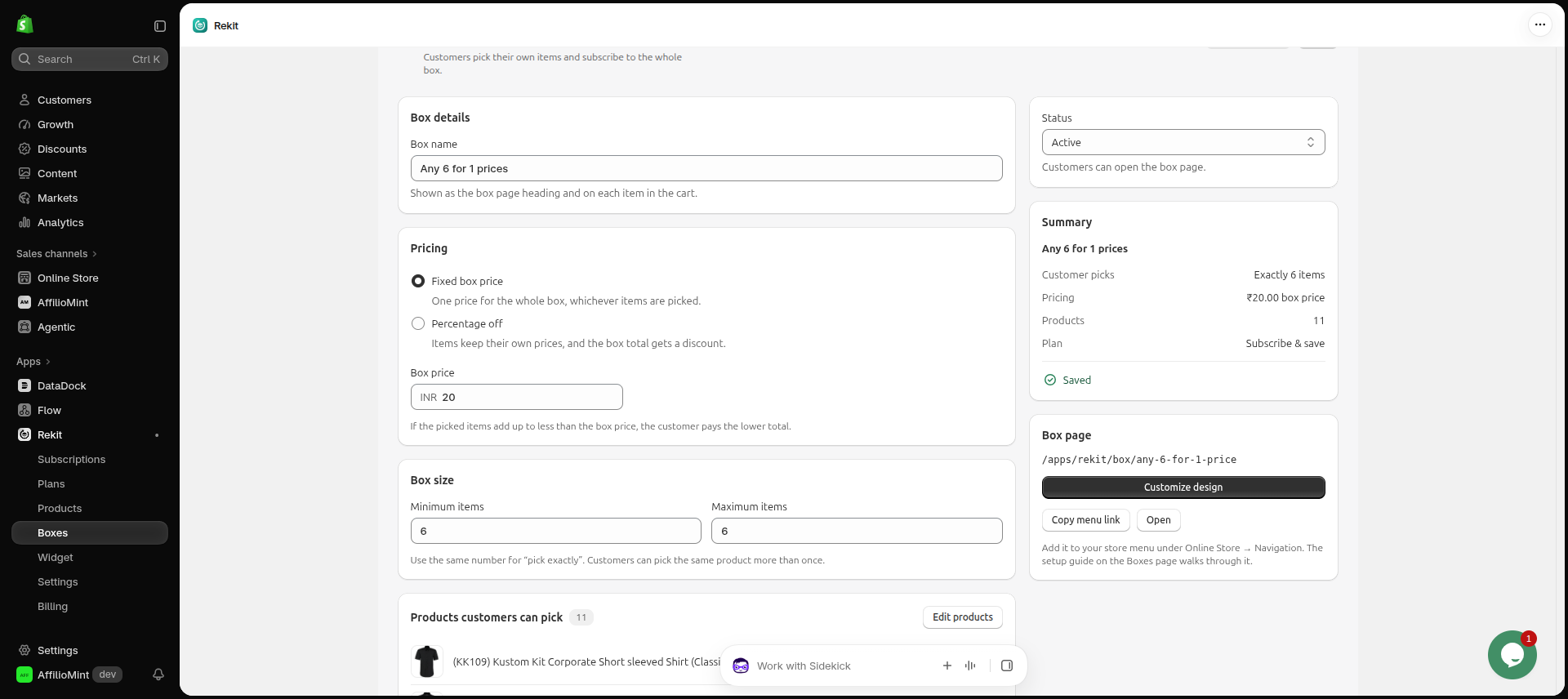
- In Rekit, open Build-a-Box and click Create box.
- Enter a Box name, for example "Any 6 for one price". It's the heading of the box page and shows on each item in the cart.
- Under Pricing, choose Fixed box price or Percentage off and enter the amount.
- Under Box size, set the Minimum items and Maximum items.
- Under Products customers can pick, add the products.
- Under Subscription plan, pick the plan from step 1. Rekit shows the delivery frequencies customers will see.
- Set Status to active and click Save.
Fixed box price or percentage off?
Both work. The right one depends on how similar your items' prices are.
| Pricing | How it works | Good for |
|---|---|---|
| Fixed box price | One price for the whole box, whichever items are picked. If the items add up to less than the box price, the customer pays the lower total. | Items that cost about the same, like bags of coffee or packs of snacks. "Any 6 for $45" is easy to understand. |
| Percentage off | Items keep their own prices, and every item in the box gets the discount. | Items with very different prices, so an expensive item doesn't make a fixed price unprofitable. |
For the box size, the same minimum and maximum gives an exact count ("any 6"). A range, like 4 to 8, lets customers decide how full the box is. With a fixed price, an exact count is usually clearer, because customers know exactly what they get for the price.
Work out your price on your most expensive likely box, not your average one. A fixed price should still leave you a margin if a customer fills the box with your priciest items.
Step 3: Design the box page and add it to your menu
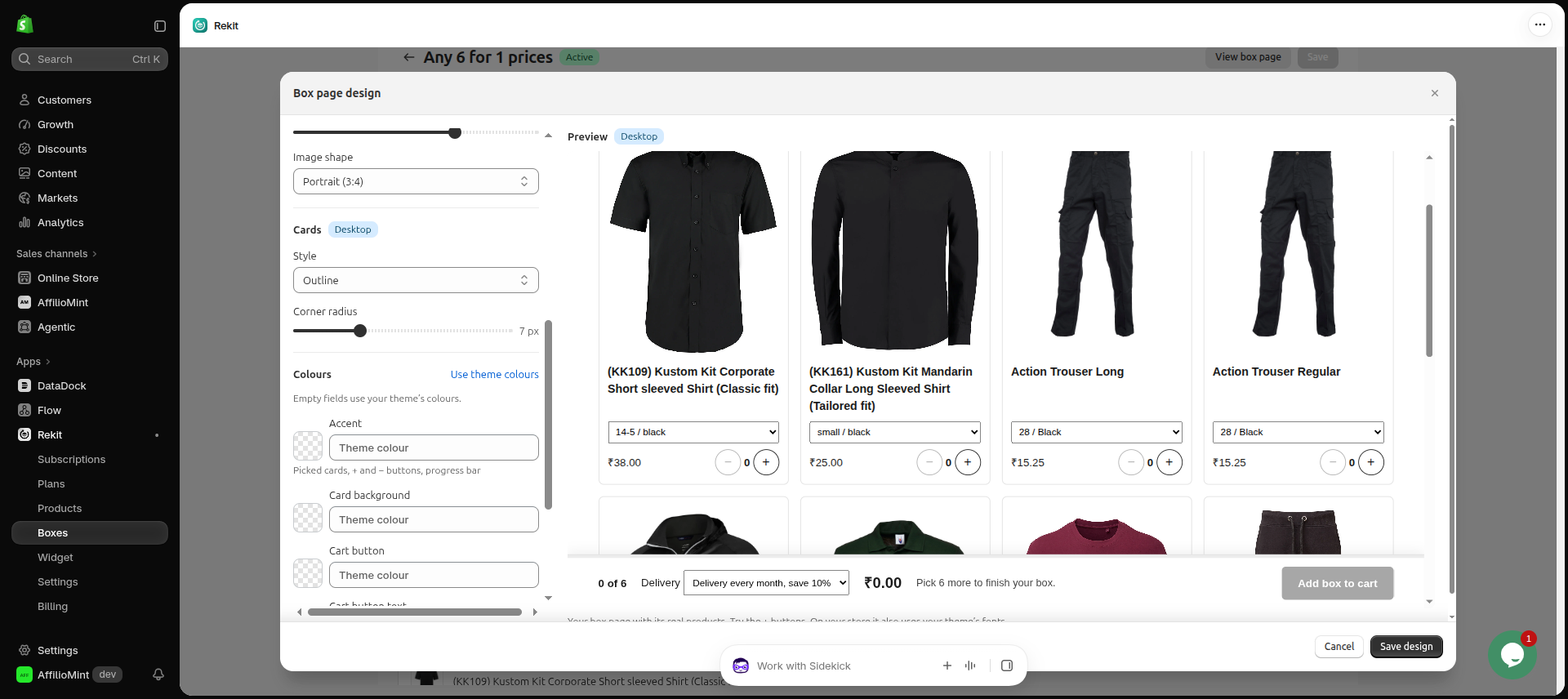
Each box gets its own page on your store, styled to match your theme. After you save the box, click Customize design to change the cards and colours and add sections around the products, such as a banner, a "How it works" section or questions and answers. You see a live preview as you go.
Add the box to your store menu
- On the box in Rekit, click Copy menu link.
- In Shopify admin, go to Content → Menus (on older admins: Online Store → Navigation) and open your main menu.
- Click Add menu item, name it, for example "Build your box", paste the link and save the menu.
You can also copy the box's full link and share it on Instagram, WhatsApp, in emails or in ads.
Step 4: Test it like a customer
- Turn on test mode for your payment provider, for example Shopify Payments test mode.
- Open the box page and pick items. The page counts them and tells the customer how many more they need.
- Choose a delivery frequency, click Add box to cart and go to checkout.
- Check that each box item shows the box discount and that the total matches your box price.
There's no discount code to set up: Rekit applies the box price at checkout. Turn test mode off again before real customers check out.
What happens after the first order
- Renewals keep the box price. Each delivery is a normal Shopify order, charged automatically, with the same box saving as the first one.
- Hiding a box doesn't change existing subscriptions. If you turn a box page off, current subscribers keep their box price.
- Subscribers manage the box themselves. In the customer portal they can skip a delivery or pause, and you can also let them swap products. See the setup guide to turn the portal on.
- A free gift works with boxes too. If you give a free gift with the first subscription order, it's added when the box goes in the cart.
If you sell coffee, the coffee subscriptions guide has more ideas for a sampler box that new customers can start with.
FAQ
Can customers buy the box once, without subscribing?
No. A box is sold as a subscription: customers choose a delivery frequency when they add it to the cart. For one-time multi-buys, use bundle offers, such as "buy 2, save 10%", on your product pages instead.
Can I have more than one box?
Yes. Each box has its own products, size, price, plan and page, so you can run, say, a coffee box and a tea box side by side.
Do I need to create a discount in Shopify?
No. Rekit applies the box price at checkout and keeps it on every renewal.
Which Rekit plan do I need?
Build-a-Box is on Freeze: $10/month or $119/year, with 0% transaction fees and a 7-day free trial. The handbook shows the box screens in more detail.
Start your build-your-own box
Let customers fill a box with what they love, and deliver it on their schedule. No code.